Showing posts with label Youtube. Show all posts

Tuesday, August 21, 2012

5 Free Video Editing Tools

Video editing tools could always beautify your personal videos before you uploading to websites for sharing. There are many of these programs that can be found, such as YouTube video editor, iMovie, etc., as have mentioned before. This article would introduce some other free video editors for readers’ reference.

1. YouTube video editor
As the largest video sharing hub in the world, YouTube offer users an easy way to edit the videos they’ve uploaded to the YouTube website. Some of the basic video editing effects and also some new features exist as face blurring, 3D, etc. YouTube Video editor absolutely make your video editing and sharing effortlessly.
Free video editor-YouTube video editor
2. Windows Movie Maker
This free movie maker for editing videos by Microsoft has been discussed before in my previous blogs. In windows XP OS PC, you can make your own videos, and then edit the picture, audio effects for better viewing. Microsoft has many add-ons for this movie maker. Updates are available in the official Microsoft website.
Free video editor-Windwos Movie Maker
3.Wax
Wax is definitely a good choice as a high performance and flexible video compositing and special effects software, whether for personal use or for business use. You can compose your dream video sequence with ease by using this tool. Being used as either a stand-alone video editor or as a plugin to other video editor, it would always perform well. It supports many video formats and also can create 3D viewing mode. It’s perfect for both beginners and professional users.
Free video editor-Wax
4. Zwei-Stein 
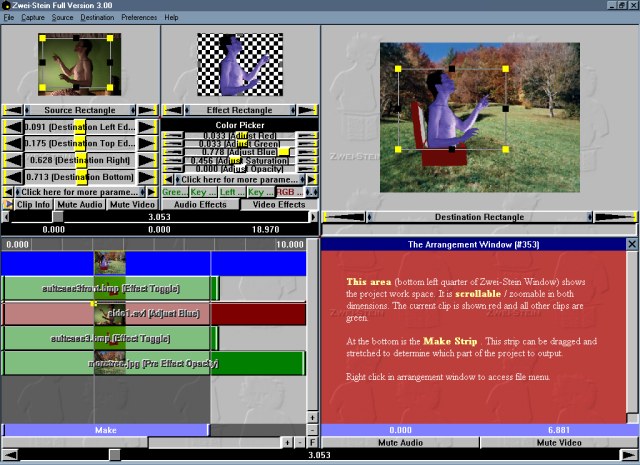
Well, this is free for personal use. With a technical interface, this full featured editor can edit up to 256 video, audio, and still image clips, each with up to 64 effects chained serially. Cropping, panning and custom effects are easy with automatic key frames.
Free video editor-Zwei-Stein
 5. ZS4 Video Editor
As the new incarnation of Zwei-Stein, ZS4 Video Editor is advanced video editng and compositing toll with over 150 built-in video effects.
Free video editor-ZS4 Video Editor
Many other video editors like Avid FreeDV which supports both Mac and Windows. This solid video software provides basic video and audio editing capabilities, as well as up to two streams of real-time effects. But it is not available any more.

Maybe you can choose one that is suitable for your video sharing needs. Although people do think that free ware like Windows movie maker just change videos slightly. After all, they’ll make your videos full of fun with some basic effects for free.

Thursday, August 9, 2012

Apple iOS 6 will Remove YouTube app

Reports from Apple and Google claim that there won’t be YouTube app as default equipment in the next generation of iPhone, or any other i–devices with iOS6 operation system from apple, which makes people recall of the fracas between the two companies to be one of the reasons. The next iPhone which is said to schedule for release in fall this year, will for the first time not include a built-in YouTube client. However, it is said that the update version of iOS5 won’t exclude this app from YouTube.
ios 6 youtube app

“Our license to include the YouTube app in iOS has ended, customers can use YouTube in the Safari browser and Google is working on a new YouTube app to be on the App Store,” Apple spokesperson Trudy Muller told Macworld.

Many people are trying to figure out the reasons for such deed from Apple, since Apple and Google have been in a subtle and cooperation relationship for years. But as Google’s promotion of its own Android smartphone-Nexus, etc. which is thought to be copycat of iPhone, and the fracas over the years leads to the breakup.

In addition, Apple also removed the Google Map app from i-devices as well. People said Apple need no help from Google.
gogle map app
Well, though big changes will take place in the soon-coming iPhone and new iPad, there is no need of worrying about what the users' should do because of the removal of such apps. The fact is, as a third-party supplier, Google will develop its own app for maps or for YouTube for users. To some extent, users of i-devices would even feel more comfortable since there’s YouTube sharing app from app store without the built-in one. Moreover, Google’ app will more than likely include additional features, such as its own notifications and ad integration.

Wednesday, August 8, 2012

New Home for Investigative Journalism on YouTube

Some of the biggest news stories of recent times have played out on YouTube—we’ve been transfixed by citizen-uploaded footage coming out of the Middle East, gained unique perspectives on natural disasters thanks to on-the-spot reporting and security cameras, and seen citizens document elections via video to ensure fair process. This growing volume of news-related video has contributed to the now 72 hours of content uploaded to YouTube every minute.

In this age of abundant content and short attention spans, thoughtful analysis and rigorous reporting is more important than ever before. That’s why we’re so pleased that investigative reporting now has a new home on YouTube—The I Files. Curated by the Center for Investigative Reporting with funding from the Knight Foundation, The I Files will be a hub and community for investigative journalism on the web, showcasing reporting that digs deep into stories, gives background to complex issues, and reveals details that help us make better sense of our world.
Contributors to The I Files include such luminary media outlets as The New York Times, BBC, ABC News and Al Jazeera, and organizations like the Investigative News Network and their member non-profit news organizations like the Pulitzer Center for Crisis Reporting, the Center for Public Integrity, and the Investigative Workshop at American University.

Subscribe to youtube.com/ifiles to get the best of online investigative journalism delivered to you as it happens.

David Gehring, News Content Partnerships Manager, recently watched “The hidden cost of hamburgers.”

From youtube-global.blogspot

Thursday, August 2, 2012

YouTube Creator Space

We’re sure you’ll agree that our YouTube stars are some of the most imaginative and creative around. It is amazing to think that some of the most successful creators on the platform, with millions of views, use little more than their bedrooms, a webcam and any props they can lay their hands on to produce compelling videos and build a global fanbase.

But many of our partners are ready to take their channels to the next level by using the latest equipment and editing techniques as well as tapping into the valuable advice from other experts and YouTube stars.

With this in mind we’re delighted to announce that in the next few weeks we’ll be opening the doors to our new creator space, housed in the offices of Google London’s Soho office. Our partners from all over Europe, Middle East and Africa will be able to book time in the space to create and collaborate with other creators, learn new techniques, as well as gaining access to state-of-the-art audio visual equipment, to help them generate great new content for their channels. The creator space is complete with the latest equipment such as DSLRs and cinema cameras, two studios including a green screen and editing suites.
The space will be overseen by the YouTube Next Lab, a team focused on accelerating the growth and development of channels and creators on YouTube. The Next Lab has launched programs like YouTube NextUp (now in 11 countries), Creator Academy and the YouTube Creator Playbook. More information on how to book will be posted on our Creator Hub.

From youtubecreator

Wednesday, August 1, 2012

Don't Let Your YouTube Videos Bore Your Audience

A study conducted at the University of South Australia's Ehrenberg-Bass Institute for Marketing Science found videos that evoke positive emotions (exhilaration, hilarity, astonishment, happiness, and inspiration) were more likely to be shared. I suspect these emotions are also the most likely to engage your customers and prompt them to subscribe to your YouTube brand channel.

For example, take a look at "The Force: Volkswagen Commercial," if you haven't already seen it. This is the most popular video on the Volkswagen USA channel with almost 53.8 million views. It also has more than 205,000 likes and less than 3,400 dislikes. That's a good ratio.
A pint-sized Darth Vader is astonished when he uses the Force on his father's new 2012 Passat in the driveway. This award-winning commercial first aired during the Super Bowl in 2011. According to the Mashable Global Ads Chart, it is also the most shared video ad of all time with more than 5.5 million shares.

Creating a laugh out loud (or a "rolling on the floor laughing") response is a key element to creating a viral video hit according to recent research conducted by the Ehrenberg-Bass Institute for Marketing Science. I think it is also more likely to turn viewers into subscribers.

Dr. Karen Nelson-Field, who conducted the research, says, "Marketers should try and up-scale the degree of arousal so if they think something is amusing, they need to get it to a point where someone will actually physically laugh out loud."

She adds, "I think the opportunity missed for marketers is they send out a video that misses the sharing opportunity but perhaps maybe worse -- bores their audience."

From imediaconnection

Tuesday, July 31, 2012

Top 4 iOS Online Video Editors for Olympic Videos

Day 5 of London 2012 Olympic Games, you probably have shot many videos in your iPhone-iPad. Do you want to edit, perfect and share your own Olympic videos with others? Free online video editing tools certainly would be perfect, since it cost no money and fewer efforts. I’ve collected some of online video editors for people using mac. These 4 websites below will help you edit your Olympic videos better.

Top 1. YouTube video editor
YouTube video editor actually only offers some basic effects for video editing. But it is so convenient for people to edit videos that you’ve uploaded to YouTube. As far as I know, YouTube is developing many new features. From the 1080 P 3D effects, to face blurring effects, and even more, YouTube is trying to make your videos perfect.
YouTube video editor
Top 2. Adobe Premiere Express
Adobe Premiere Express makes it possible for you to edit your videos effortlessly-no experience necessary. A browser and the free adobe flash player (as almost all people may have installed one in their PC), are all you need. Recording, splitting, and trimming; adding music, photos, effects, etc. are all available.
Adobe
Top 3. Photobucket
Photobucket could be regarded as one of the most popular video and photo editing tool. Besides, it is also claimed to be the easiest way of editing videos and photos on your phone. With rich features, this editor is easy to operate. There are many themes to select. With it, you can upload your videos, photos to the website for sharing.
Photobucket
Top 4. Movie Masher
Movie Masher provides both the front and back ends of a complete online video editing application, enabling your middleware layer to control every aspect of its presentation and underlying functionality.
Movie Masher
Features:
  • enable your users to seamlessly mix video, audio, images and text
  • deploy on any site for free under an open source license (MPL 1.1)
  • control every aspect of the editing interface and underlying functionality
  • build your own controls, effects, transitions and titles in Adobe Flash™
Why not try some of them to edit your videos? You can upload your Olympic videos to YouTube for sharing. Enjoy the Olympic and enjoy your videos with these nice editors!

Friday, July 27, 2012

How to Make Your how-to Videos Reach Audience

Occasionally, we like to share stories of how businesses have achieved success on YouTube. Today we will look at examples of using how-to videos to reach the right customers online.

These are just a few how-to focused searches being typed into YouTube by ambitious do-it-yourselfers this summer. Many savvy business have realized that YouTube is not just an entertainment hub - it is also an educational forum for eager learners. Here are a few tips from the pros on creating how-to content most relevant to your audience:

1. Keep things simple. Let’s take a look at Lowe's. The second-largest home improvement retailer worldwide simplifies DIY projects with hundreds of how-to YouTube videos in the form of “video snacks.” These short and sweet informational videos satisfy DIY-ers’ cravings to complete at-home projects by homing in on specific steps of the process. So if you are building a fence, you can start with a video about the layout and digging post holes and follow the series to the final step, attaching the gate.
2. Identify your audience. Know who you’re trying to reach and then focus on topics you think they’re most interested in watching. ModCloth, an online-only indie and vintage-inspired clothing retailer, has a clear understanding of the “ModCloth girl” — a girl who is into travel, art, glitter, and DIY projects of course. They create how-to videos tailored to the ModCloth girl lifestyle, whether it’s how to style a headband or how to pack for the campground.
What can you teach new potential customers? Join our conversation on the YouTube for marketers Google+ page, and if you’re looking to get started with video advertising on YouTube, sign up for Google AdWords for video, which is the easiest way to drive viewers to your videos.

Source from youtube-global.blogspot

Tuesday, July 24, 2012

Current YouTube Video Editor

YouTube
The latest YouTube editor function-face blurring effect has enjoyed favor. A while back, Matt wrote an article about the 2010 YouTube Video Editor, and although it doesn’t seem that long ago, a lot has changed. Back then, it had a few basic features, but in all honesty, it just wasn’t really that functional. However, two years later, it’s high time to revisit the video web app. Everyone deserves a second chance, right?

First off, I’ll say this – the YouTube video editor is functional, to some extent. As with anything, there are different aspects when it comes to hitting a target audience, so let’s just say you won’t be cutting the next Academy Award winner (or maybe you’re one of those avant-garde artists who will use nothing but an iPhone and the YouTube Video Editor to create the most revolutionary work ever made). However, the app is definitely worth checking out regardless of whether you plan on using it regularly or not.

The Editor
Back when we first took a look at the YouTube Video Editor, we saw that it included some standard functions: cropping video, video splicing (a must), and Audioswap. However, the new video editor does a little bit more, but before I begin, I just want to just mention that splicing is about the only thing that is the same. Realistically, you can’t change that much.
clips splicing
With the editor, you can put any clips you have uploaded into one big video. This is ideal for family vacation videos taken with iPhones. If you are already uploading goofy little clips of your family online, why not put them in one home movie? Seems reasonable to me. Additionally, there is a Creative Commons video library so that you can insert stock footage into your own videos. I’m not entirely sure what you would use this for, but I’m sure you could make some nifty stuff with it.
titles
Other stuff that you can use (that would be found on any standard movie editor) include actual titles and some (corny) transitions. Furthermore, the Audioswap song selection is still around, but it looks a lot more user-friendly.
transitions
The Enhancements
What was lacking with the earlier version of the YouTube Video Editor were Enhancements. Although not actually part of the editor, the Enhancement section of YouTube provides several ways to alter the look of your video or adjust the audio. Although they aren’t the most professional tools, they are still pretty great for what they are.
enhancement
The Enhancement section can be found in the video manager section of your channel through any of your videos, and its content is divided into three categories: quick fix, effects, and audio. The quick fix includes basic adjustments for issues such as contrast and even saturation. As for the effects, there are many different methods of color grading available. Also, the audio is pretty much the same as the one you would find in the editor.

All in all, the one thing that really stands out with me concerning these Enhancements is the implementations of a video stabilizer. As you may know, a lot of the video content on YouTube is shot on tiny, handheld, shaky smartphones. With the stabilizer, there is actually a chance of getting some smooth video. Just pop your shaky video into the stabilizer, and YouTube should do the rest.

From makeuseof

Sunday, July 22, 2012

‘Ripping Music From Videos is Legal’ Lawyers Say

Remember the good ol’ days when you’d tape your favourite song off the radio? Or get up early to grab a VHS copy of your favourite music video?

Those days are long behind us now, but a student is using the example as a legal precedent in a battle with internet giant YouTube.
YouTube
Mashable reports that 21-year-old computer science student, Philip Matesanz of Germany, believes that users of YouTube should be allowed to convert its video content into downloadable .mp3s. Which his website, youtube-mp3.org, allows its one million strong userbase to do daily.

Matesanz was issued a cease-and-desist from YouTube and its owners, Google, over his website claiming that his site’s ability to rip audio content is considered a breach of YouTube’s terms of service as well as of user copyright. But in his legal research, Matesanz’ lawyers have uncovered a legal precedent.

They site a historical parallel between the video uploaded website and public broadcasters like radio and television, and that make a private copy of such a public broadcast is perfectly legal – only the delivery method has changed. Google and YouTube disagree, saying that its a violation of user rights.

In response to Google’s cease-and-desist, Matesanz has also put together an online petition for his website, asking his users to support and defend his website based on the legal precedent. Its already gained nearly 800,000 signatures in the short two weeks its been put together.

The petition, written by Matesanz, reads: “For decades people were allowed to take a private copy of a public broadcast. You could record the radio program with a cassette recorder or make a copy of your favorite movie by using a video recorder. All these techniques have been opposed heavily in its early years by the big media companies who didn’t want the public to have such technology.”

“Several years later history is about to repeat,” writes Matesanz, “Google has teamed up with the RIAA to make the same claims against all sorts of online recording tools for their 21th century broadcasting service. Google is taking action against nearly every service that enables its users to create a private copy of a public YouTube broadcast while the RIAA is threatening news media like CNet for promoting such software.”

Matesanz also proposes that YouTube’s cease-and-desist letter is accusing him of a technological process his site does not use. The terms or service of YouTube’s personal conditions prohibits users from using its API downloading content as opposed to streaming it. However, Matesanz claims his site doesn’t gather data through the internal services, but external programming.

Regardless, there’s clearly a demand for YouTube and Google to provide a service that allows their uses to access audio content in downloadable formats (like .mp3) for offline use. Probably because the video website makes most of its money through advertising, that streams before content.

However, there may be another reason for Google’s cease-and-desist letter to youtube-mp3.org, it’s a market they want to corner themselves…

Last month, Google introduced a way to watch certain content while offline in in its YouTube Android app, indicating that the internet giant is looking at ways of combating the influx of streaming services, who allow access to music content that browsers typically went to YouTube for.

It’s another interesting legal case that has sprung up as a result of the push for greater media dissemination and the level of control that’s wrestled between content providers and what consumers and users deem what they can do with that content.

Similarly, the Canadian Supreme Court ruled in favour of telecommunication companies that scrapped additional r0yalties for musicians, writers and publishers for music used in videogames and movies; essentially good news for internet service providers and bad news for music-makers and their copyright.

Music and copyright infringement is an issue that won’t go away anytime soon, particularly as digital services endeavour to give consumers more access to music without considering the implications of it use. It’s an issue that marred the rise of musical piracy, leading to ugly ‘label versus individual’ cases – such as when a US High Court refused to reduce a student’s $US 675,000 fine for illegally downloading 30 songs. While Japan recently changed their laws to severely punish individuals who breach copyright infringement.

In the case of Matesanz and his .mp3 conversion website, it’s an issue of control and definition, with a pleas in his petition for “Google to break their silence and participate in an open and fair discussion with the intention to find a solution that suits the needs of the users.”
From tonedeaf

Thursday, July 19, 2012

Face Blurring YouTube-New Video Editing Effects

After releasing a basic video editing tool last year, earlier this year in March 2012 YouTube start something new. YouTube planned to improve the video quality automatically. Users can edit and revise motion pictures and colors. Preview before you decide to save the changes, also you can undo the changes if you’re not satisfied.
face blurring

That’s what YouTube announced to do months ago. Recently in July this year, a new tool of video editing from YouTube will also appear soon. The new function-facial blurring tool will let anyone using the site’s web video editor blur the identities of people existing in the videos. It is quite easy to achieve the effects simply by clicking “enhancements” tab in the video editor and apply filter.

Google warns that as face blurring is an “emerging technology”, it is far away from perfect. Google has also published additional guidelines to help people who upload sensitive footage on the website. To some extent, this will be better safe than sorry. Except for faces, other factors such as: names, car license plates, clothes, and other things that may disclose the men’s identity in the videos.

“YouTube is proud to be a destination where people worldwide come to share their stories, including activists. Along with efforts like the Human Rights Channel and Citizentube that curate these voices, we hope that the new technologies we’re rolling out will facilitate the sharing of even more stories on our platform.” YouTube blog wrote.

Such kind of tool applied in video websites is about to be the first time made by YouTube. According to the international human rights organization WITNESS’ Cameras Everywhere report,“No video-sharing site or hardware manufacturer currently offers users the option to blur faces or protect identity.”So far, no other video sharing services or websites provides such features.

Once put into practice, most users showed that it really is a cool tool. Well, what’s your opinion?

Monday, July 9, 2012

Make and Edit Your Own Music Video


create music video

When it comes to photography and video apps for the iPhone and other iOS devices, developers keep coming up with amazing fun programs for all ages. Point in case, a popular five-star app called Video Star, which mixes karaoke and music videos for some crazy fun productions.

Video Star enables you to create music video based on lip-syncing a song track in your video supported iOS device. You simply launch the app, choose a song like Donna Summers “Last Dance,” record yourself or someone else to lip-sync the song, and add special effects as you record the production. In a matter of minutes you can produce and share your music video.

Here’s a sample video that shows just such a production:


iMovie Tutorial for Beginners

iMovie is a proprietary video editing software application sold by Apple Inc. for the Mac, iPhone, iPad, and iPod touch. It was originally released in 1999 as a Mac OS 8 application bundled with the first FireWire-enabled consumer Mac model – the iMac DV.Since version 3, iMovie has been an OS X-only application included with the iLife suite of Macintosh applications.(from wikipedia)

What shown above is a imovie toturial from youtube for the beginners from youtube.

Friday, July 6, 2012

Tutorial of Youtube Video Editor

This video shows you how to edit your videos with youtube video editor online. Enjoy your video editing.

From youtube